A Beginner's Guide to Using ForeFlight
Getting Started with ForeFlight: A Beginner's Guide
Whether you just purchased your first iPad or you are weeks away from your first solo flight, learning to use ForeFlight is one of the smartest steps you can take as a student or new pilot. ForeFlight is an all-in-one mobile flight planning application widely used by pilots of every experience level — from student pilots filing their first cross-country plan to airline crews checking weather en route. This beginner's guide to using ForeFlight will walk you through the core features, practical tips, and how to integrate the app into your broader aviation training without losing sight of the fundamentals your FAA written test will cover.
What Is ForeFlight and Why Do Pilots Use It?
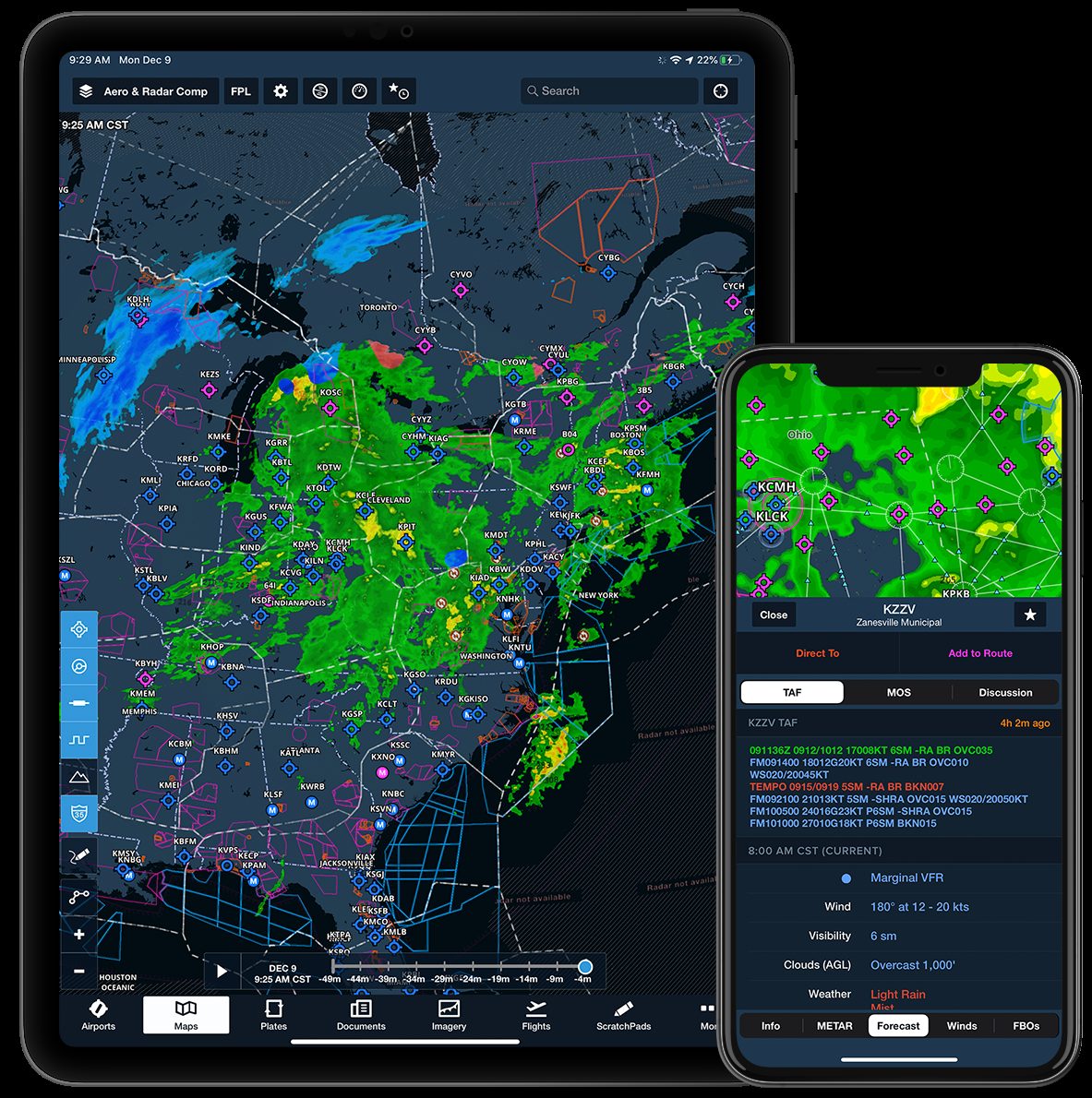
ForeFlight is a subscription-based aviation app available for iPad and iPhone that combines moving-map navigation, real-time weather, flight planning, aeronautical charts, and much more into a single, intuitive interface. The FAA authorizes electronic flight bags (EFBs) as a replacement for paper charts in many operations, and ForeFlight is one of the most popular EFB solutions in general aviation.
Pilots are drawn to ForeFlight for several reasons:
- Integrated weather products — METARs, TAFs, PIREPs, SIGMETs, AIRMETs, and graphical forecasts are all accessible from one place.
- Current aeronautical charts — Sectional charts, IFR low and high enroute charts, and terminal procedure charts update automatically with each FAA chart cycle.
- Flight planning tools — Route entry, weight-and-balance calculations, fuel planning, and automated weather briefings help you plan a safe flight efficiently.
- Track log and logbook integration — The app can record your flights automatically and sync with digital logbook platforms.
That said, ForeFlight is a tool — not a substitute for understanding the aeronautical concepts behind what it displays. Make sure your ground knowledge is solid alongside your app skills.
Setting Up ForeFlight for the First Time
After downloading ForeFlight from the App Store and choosing a subscription tier, a few setup steps will make the experience much smoother from the start.
1. Create Your Profile and Aircraft
Navigate to the More tab and select Aircraft. Add the make, model, and performance data for the airplane you fly most often. Accurate performance numbers — cruise speed, fuel burn, climb rates — are what allow ForeFlight to generate realistic flight plans and fuel estimates. If you are flying multiple aircraft during training, you can save several profiles and switch between them before each flight.
2. Download Charts for Offline Use
Do not rely solely on in-flight Wi-Fi or LTE. Go to Downloads under the Maps section and download sectional charts, terminal area charts, and procedure charts for your region. ForeFlight will remind you when charts are nearing expiration, but get in the habit of refreshing them before each chart cycle — which the FAA typically releases every 56 days for sectionals.
3. Connect a GPS Source
An iPad with cellular capability has a built-in GPS, but a dedicated ADS-B receiver (such as a Stratus or Garmin GDL series device) provides significantly better GPS accuracy and brings in real-time traffic and weather data in the cockpit. Check with your flight school about what hardware is available before investing.
Navigating the Core Features
Maps
The Maps tab is the heart of ForeFlight. Here you can overlay different chart types, display weather, see TFRs, and view your planned route. Tap any airport identifier to pull up a detailed info page including runways, frequencies, fuel availability, and the current METAR. Spend time exploring the layer options — understanding what each overlay shows will sharpen your situational awareness in the cockpit.
Airports
The Airports tab gives you quick access to detailed information about any airport in the database. You can view runway diagrams, available instrument approaches, and NOTAMs. Reviewing NOTAMs before every flight is not just good practice — it is a regulatory requirement, and the FAA written test will expect you to know how to obtain a proper preflight weather and NOTAM briefing.
Weather Briefings
Under the Flights tab, you can generate an official weather briefing through ForeFlight's integration with 1800wxbrief.com. This connects you to Leidos Flight Service and satisfies the regulatory requirement to obtain a standard preflight briefing. Pay close attention to AIRMETs and SIGMETs, as these highlight conditions that may be hazardous to your category of aircraft. Understanding how to interpret these products is a key knowledge area tested on the FAA written exam — our free practice test includes weather questions aligned with the current ACS to help you sharpen those skills.
Flight Planning
Tap the pencil icon on the Maps screen or use the Flights tab to start a new flight plan. Type in your departure and destination airports, and ForeFlight will auto-populate a direct route. From there you can add waypoints, airways, or SIDs and STARs if flying IFR. Once your route is set, tap Navlog to review a detailed navigation log with headings, distances, time estimates, and fuel burns for each leg. Cross-checking this against your manual calculations is an excellent habit during training.
ForeFlight Tips for Student Pilots
Using ForeFlight effectively in training takes intentional practice. Here are some habits that experienced pilots and FAA-certified instructors recommend early on:
- Use ForeFlight to study, not just fly. Explore the sectional chart for your local area on the ground. Identify airspace boundaries, obstacles, special use airspace, and airports. This kind of chair-flying builds chart-reading skills that directly translate to written-test knowledge.
- Cross-check everything manually during training. Your instructor will likely ask you to plan cross-countries using paper charts and manual calculations before leaning on ForeFlight. Do not skip that step — understanding how to manually compute headings, time en route, and fuel requirements is tested on your FAA knowledge exam.
- Learn what each weather product means. Do not just glance at the green, yellow, or red colors on the weather overlay. Tap into individual METARs and TAFs and practice decoding them. Knowing the official definitions behind those colors is essential knowledge for your written test and for real-world go/no-go decisions.
- Keep the app updated. ForeFlight releases regular updates that improve stability and add features. Enable automatic updates and always check that you are running the current version before a flight.
- Use it alongside your ground school curriculum. ForeFlight displays concepts your written test covers — airspace, weather products, NOTAMs, fuel planning. Connecting app features to knowledge areas reinforces both simultaneously.
Connecting ForeFlight Proficiency to Your FAA Written Test
ForeFlight fluency and FAA written test readiness go hand in hand — but they require different types of study. The written test assesses your conceptual understanding of the rules, regulations, and aeronautical knowledge behind the tools you use. Practicing with ACS-aligned practice questions is the structured way to build that conceptual foundation.
At Aviation Test Prep, our platform was built by FAA-certified instructors who understand how real-world flying and test-taking knowledge overlap. Our ACS-aligned practice questions mirror the topics and style of the FAA knowledge exam, and our AI tutor — Ace — provides on-demand explanations so you understand why an answer is correct, not just which letter to choose. You can explore how our question bank maps to specific knowledge areas through our ACS codes reference, making it easy to identify and strengthen weak spots.
Our 5-step study method — assess, learn, practice, review, and test — is designed to take you from first-time study session to exam-day confidence in a structured, efficient way. ForeFlight can support the apply phase of your learning beautifully when you use it actively on the ground, not just passively in the air.
Final Thoughts
ForeFlight is a powerful tool that, used correctly, enhances safety, efficiency, and situational awareness for pilots at every stage of their career. As a beginner, the best approach is to learn its features deliberately, always cross-check its outputs with your own aeronautical knowledge, and use it as a complement to — not a replacement for — solid ground school preparation. Understanding the why behind what ForeFlight displays will make you a better pilot and a more confident test-taker.
Ready to build the knowledge foundation that makes tools like ForeFlight truly powerful? Start your free Aviation Test Prep account today and take your first step toward exam-day confidence.
Ready to pass your FAA written exam?