The VOR (VHF Omnidirectional Range) remains one of the foundational navigation systems in instrument flying, and understanding exactly how radials, the TO/FROM indicator, and Course Deviation Indicator (CDI) sensing work is essential for both the Instrument Rating knowledge test and real-world IFR operations. Many student pilots can tune a VOR and watch the needle deflect, but fewer can explain why the needle moves the way it does — or why it sometimes appears to work backwards. This article breaks down the geometry and logic so that VOR navigation becomes intuitive rather than mysterious.
At its core, a VOR ground station transmits two signals simultaneously: a reference phase signal broadcast omnidirectionally, and a variable phase signal that rotates around the station 30 times per second. Your aircraft's VOR receiver compares the phase difference between those two signals to determine your magnetic bearing from the station — this is the radial you are on. Understanding that radials are always measured from the station outward is the first key insight in mastering VOR navigation.
What Is a VOR Radial?
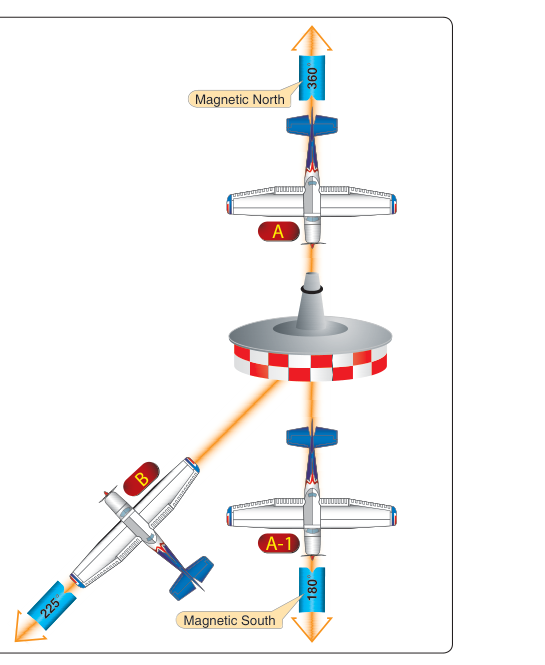
A VOR radial is a magnetic bearing measured outward from the station. Think of the station as the center of a clock, with 360 radial lines extending outward like spokes. The 090 radial extends due east of the station, the 270 radial extends due west, and so on. When ATC tells you to "fly the 270 radial," they mean the line that goes west from the VOR — you would be west of the station, flying further west, or flying to intercept that line from some direction.
Crucially, radials do not describe the direction you are flying; they describe where you are relative to the station. You can be on the 090 radial flying eastbound (away from the station) or flying westbound (toward the station). This distinction is where the TO/FROM indicator becomes indispensable.
The TO/FROM Indicator: How It Works
The TO/FROM indicator (also called the ambiguity indicator or sense indicator) tells you whether the Omni Bearing Selector (OBS) course you have set will take you toward the station or away from it — assuming you actually flew that heading. It does not tell you which direction you are currently flying; it only compares your selected course against your position relative to the station.
Here is the underlying geometry: the VOR divides the airspace around the station into two hemispheres separated by a line perpendicular to the selected OBS course. If your aircraft is in the hemisphere on the side of the station that the selected course points toward, the flag shows TO. If you are in the hemisphere on the far side — the side away from the direction the OBS course points — the flag shows FROM.
A practical example: you are directly east of the VOR and you set 270° in the OBS. A heading of 270° would fly you toward the station (westbound, toward the station that is west of you — wait, let's clarify). You are east of the station; flying 270° (westbound) flies you toward the station. The VOR sees you in the hemisphere where flying 270° would reach the station, so the flag reads TO. Now rotate the OBS to 090°. Flying 090° (eastbound) takes you further away from the station. You are now in the hemisphere where flying 090° takes you away, so the flag reads FROM.
There is also a neutral or "off" zone when the aircraft is nearly perpendicular to the selected course — roughly within 90 degrees either side. In this zone, the TO/FROM indicator may fluctuate or read OFF, which is normal and simply means you are near the boundary between the TO and FROM hemispheres.
CDI Needle Deflection and Course Tracking
The CDI needle deflects left or right to show which side of your selected course your aircraft is on. Each dot of deflection on a standard VOR CDI represents approximately 2 degrees of angular deviation from the selected course, and full-scale deflection (the needle pegged to one side) is reached at approximately 10 degrees off course. This is important: the further you are from the station, the greater the actual lateral distance represented by a single dot of deflection.
When tracking toward the station with TO showing, the CDI behaves intuitively: if the needle deflects to the right, you are left of course and should fly right to re-center it. This is called normal sensing. Fly the needle — turn toward the deflection.
Reverse Sensing: The Critical Pitfall
Reverse sensing is one of the most dangerous and frequently misunderstood phenomena in VOR navigation. It occurs when a pilot tracks toward the station but has set the reciprocal (opposite) course in the OBS, causing the CDI needle to deflect away from the actual course rather than toward it. Flying the needle in this situation makes the deviation worse, not better.
Here is how it happens: suppose you are flying inbound on the 090 radial (flying westbound toward the station, on a 270° track). You should have 270° set in the OBS with a TO indication. Instead, if you accidentally set 090° in the OBS, you get a FROM indication, and the CDI needle now deflects opposite to what you would expect. If the needle is left, the actual course is to the right — but your instinct to "fly the needle" (turn left) takes you further off course. This is reverse sensing.
Reverse sensing can also occur when flying an HSI (Horizontal Situation Indicator) if the OBS is set to the wrong course, or when operating with certain RNAV or autopilot configurations. The rule to avoid reverse sensing is simple: always set the OBS to the course you intend to fly (the inbound or outbound course), not the radial number unless those happen to be the same thing.
Tracking Outbound on a Radial
Flying outbound from a VOR is perfectly normal — you simply set the radial number in the OBS and the flag will show FROM. The CDI still deflects toward the course, so normal sensing applies: if the needle goes right, turn right. Many students get confused because they associate the FROM flag with "something is wrong," but a FROM indication with the radial number set is exactly correct for outbound tracking. The only time you should be concerned is if you expect TO and see FROM, or vice versa.
Why It Matters in IFR Operations
In actual IFR flight, VOR radials define airways (Victor airways in the low-altitude structure), published instrument approach courses, holding patterns, and departure/arrival routes. Misidentifying your position relative to a radial or misreading the TO/FROM indicator can lead to flying the wrong direction on an airway, missing an approach course intercept, or — in the worst case — controlled flight toward terrain. The FAA Instrument Flying Handbook (FAA-H-8083-15) emphasizes that a thorough understanding of VOR fundamentals is not optional; it is the foundation upon which all other navigation cross-checks are built.
The TO/FROM indicator also plays a role in VOR approaches. On a VOR approach, you fly the final approach course inbound with a TO indication. Station passage — when the flag flips from TO to FROM — is an important fix in the approach sequence: on many VOR approaches the VOR itself is located at or near the airport and serves as the Missed Approach Point, so the flip marks arrival at the MAP; on approaches where the VOR is the Final Approach Fix instead, the flip marks the start of final approach timing to a separate MAP. Which one applies depends on the specific published procedure.
Key Numbers and Rules
- Radials are always FROM the station: The 180 radial extends due south from the VOR.
- CDI deflection: Approximately 2° per dot; full-scale at approximately 10° off course on a standard VOR indicator.
- TO indication: Your selected OBS course, if flown, will take you toward the station (you are on the station side of that course).
- FROM indication: Your selected OBS course, if flown, will take you away from the station.
- Reverse sensing fix: Always set the OBS to the course you intend to fly, not the reciprocal. Confirm TO when inbound, FROM when outbound.
- Station passage: The TO/FROM flag flips (often via an OFF/ambiguous zone) as you pass over or very near the VOR; this is a reliable positional fix.
- VOR operational check tolerances (14 CFR 91.171): VOT or ground checkpoint within ±4°; airborne checkpoint within ±6°; dual VOR cross-check within ±4° of each other.
Memory Aid
For the TO/FROM logic, use the phrase "TO = toward, aim the arrow." Visualize the OBS course as an arrow pointing from you toward the station. If that arrow would reach the station, you get TO. Flip the arrow 180° (set the reciprocal), and it now points away — FROM. This mental image reinforces correct OBS setting: always point your arrow at where you want to go.
Common Test Traps
- Confusing the radial with the inbound course: The 360 radial extends north from the station; the inbound course to track it is 180° (southbound). The FAA knowledge test frequently asks which OBS setting to use for inbound tracking, expecting you to select the inbound course (180°), not the radial number (360°).
- Misreading the TO/FROM flag direction: The flag tells you about your OBS-selected course relative to the station — it is NOT a heading indicator. You can have a TO flag while flying away from the station if you set the wrong course.
- Reverse sensing on approach: The test may describe a scenario where a pilot has set the wrong course and asks why corrections are making the deviation worse. Recognize this as reverse sensing.
- FROM flag anxiety: Students often think a FROM flag means they set up wrong. On outbound tracking with the radial set in the OBS, FROM is correct. The error is getting FROM when you expect TO, or vice versa.
- Station passage in holding: When holding over a VOR, the TO/FROM flip is a reliable time check for inbound/outbound legs. Missing this indication is a common procedural error on check rides and knowledge test scenarios.