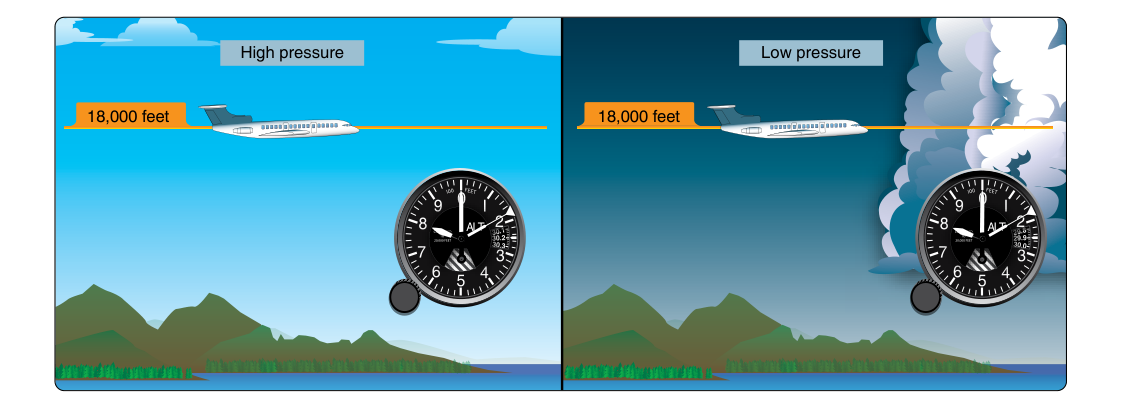
Of all the flight instruments in the cockpit, the altimeter may be the one most quietly relied upon and least understood. It is the primary reference for maintaining assigned altitudes, executing instrument approaches, and staying safely above terrain and obstacles during IFR flight. Yet its accuracy is not automatic — it depends entirely on a correct atmospheric pressure setting dialed into a small adjustment window on its face. Understanding exactly how the altimeter works, how errors creep in, and what the regulations demand of you before every instrument flight is foundational knowledge for the instrument rating.
This article covers the mechanics of the sensitive altimeter, the Kollsman window (also called the barometric subscale), the procedures for obtaining and applying current altimeter settings, and the error analysis that helps you catch problems before they become emergencies.
How the Altimeter Works
A sensitive altimeter is essentially an aneroid barometer connected to a mechanical display system. Inside the instrument case are one or more sealed, corrugated metal capsules called aneroid wafers. These wafers are connected to the aircraft's static pressure system. As the aircraft climbs, ambient static pressure decreases, and the aneroid wafers expand; as the aircraft descends, pressure increases, and the wafers compress. A gear-and-lever mechanism converts this expansion and contraction into needle movement on the face of the instrument, which displays altitude in feet.
The critical point is that the altimeter measures pressure, not altitude directly. It infers altitude by comparing current static pressure to a reference — specifically, the pressure value set in the Kollsman window. Because atmospheric pressure at sea level varies from day to day and location to location, the pilot must adjust the reference to the current local altimeter setting to obtain an accurate read. Without this adjustment, the instrument will report a pressure altitude (the altitude relative to the standard datum of 29.92 in. Hg) rather than a corrected indicated altitude.
The Kollsman Window
The Kollsman window is the small subscale window on the face of the altimeter, typically located at the 3 o'clock or 9 o'clock position. It displays barometric pressure in inches of mercury (in. Hg) in the United States, ranging from approximately 28.00 to 31.00 in. Hg. A knob on the lower-left of the instrument allows the pilot to rotate the subscale. As you rotate the Kollsman setting, both the subscale value and the altimeter's indicated altitude change simultaneously — roughly 1,000 feet of altitude change per 1 in. Hg of pressure change (more precisely, about 1,000 ft/in. Hg near sea level, though this ratio changes with altitude).
When you set the local altimeter setting — the current sea-level pressure for your area provided by ATC or ASOS/AWOS — the instrument corrects for the difference between standard sea-level pressure (29.92 in. Hg) and the actual sea-level pressure. The result is that the altimeter now reads your height above mean sea level (MSL), assuming standard temperature. This is called indicated altitude.
Types of Altitude — Why They Matter
Understanding the vocabulary is essential for both the knowledge test and practical flight:
- Indicated Altitude: What the altimeter reads with the local altimeter setting dialed in. This is what ATC assigns and what you fly.
- Pressure Altitude: The reading when 29.92 in. Hg is set in the Kollsman window. Used for performance calculations and above FL180 in the United States.
- Density Altitude: Pressure altitude corrected for non-standard temperature — critical for performance but not directly read from the altimeter.
- True Altitude: Your actual height above MSL. Indicated altitude approximates true altitude when temperature is standard, but cold temperatures cause the altimeter to over-read actual height.
- Absolute Altitude: Your actual height above ground level (AGL) — not shown by the altimeter unless you happen to be over terrain at exactly the elevation set in the Kollsman window.
Altimeter Setting Regulations Under 14 CFR
The FAA establishes specific requirements for altimeter settings in 14 CFR Part 91.121. The rule distinguishes between operations below and above 18,000 feet MSL:
- Below 18,000 feet MSL: Set the current reported altimeter setting of a station along your route and within 100 nautical miles of your position. If no such station is available, use the current reported setting for an appropriate available station. If no reporting station is available, set the altimeter to the elevation of the departure airport or to an appropriate altimeter setting available before departure — this option is not limited to uncontrolled airspace.
- At or above 18,000 feet MSL (Class A airspace): Set 29.92 in. Hg (standard pressure). Above FL180, all aircraft use the same datum, eliminating pressure setting discrepancies between aircraft flying nearby altitudes. Flight levels (FL) replace altitude designations above this boundary.
- Transition altitude: When climbing through 18,000 feet, pilots set 29.92 in. Hg. When descending through 18,000 feet, pilots obtain and set the current local altimeter setting before crossing back below the transition level.
ATC will provide altimeter settings as a matter of routine during IFR operations — at initial contact, when crossing sector boundaries, and during approach briefings. You are also expected to monitor ATIS, ASOS, or AWOS and update the Kollsman window proactively.
Error Analysis — How Much Does a Wrong Setting Cost You?
The practical danger of an incorrect altimeter setting is straightforward: every 0.10 in. Hg of error in the Kollsman window produces approximately 100 feet of indicated altitude error. Consider what this means in practice:
- If the current altimeter setting is 29.62 in. Hg but you still have 29.92 in. Hg set (a 0.30 in. Hg error), your altimeter reads approximately 300 feet too high. You believe you are at 3,000 feet MSL; you are actually at 2,700 feet MSL. In mountainous terrain or near obstacle departure procedures, this error can be fatal.
- Flying from a high-pressure area into a low-pressure area without updating the setting causes the altimeter to progressively over-read. The old memory aid applies: High to low, look out below — the aircraft is lower than indicated.
- Temperature also affects true altitude. In very cold air (well below standard), true altitude is lower than indicated altitude. Cold temperature corrections are required on instrument approaches at some airports, and the FAA has published correction tables for this purpose.
Practical Procedures for IFR Altimeter Setting
For an IFR flight, the recommended workflow is consistent and methodical:
- Before engine start: Set the current ATIS or ASOS altimeter setting in the Kollsman window. Verify that the altimeter reads within 75 feet of the known field elevation. This tolerance comes from AIM 7-2-3 as a preflight sanity check (in conjunction with the periodic altimeter system test standards of 14 CFR Part 43 Appendix E), not from a preflight requirement written into 91.411 itself.
- Taxi and before takeoff: Confirm the altimeter setting has not changed; update if a newer ATIS has been received.
- Departure and en route: Accept updated altimeter settings from ATC as offered. When flying long cross-country legs, request updated settings if ATC does not volunteer them, especially when transitioning weather systems.
- Approach: During the approach briefing, confirm the current altimeter setting from the latest ATIS or from ATC. Set it before beginning the final approach segment. An incorrect setting during an instrument approach can cause you to descend below the minimum descent altitude (MDA) or decision altitude (DA) while the instrument suggests you are still above it.
- Climbing through 18,000 feet: Set 29.92 in. Hg (standard) at or before reaching FL180.
- Descending through 18,000 feet: Obtain and set the local altimeter setting before crossing FL180 inbound.
Altimeter System Tests and IFR Certification
Under 14 CFR 91.411, no person may operate an aircraft in controlled airspace under IFR unless the altimeter system and altitude reporting equipment have been tested, inspected, and found to meet performance standards within the preceding 24 calendar months. This test must be performed by a certificated repair station or the aircraft manufacturer. The test ensures that the static system is free of leaks, the altimeter capsule is accurate across the operational range, and the encoder accurately reports pressure altitude to ATC's radar system. A leak in the static system can cause the altimeter to freeze (indicating a constant altitude), lag, or read erroneously — an insidious failure mode during IMC flight.
Common Test Traps
- Confusing 75 feet with a regulatory limit: The 75-foot pre-flight check is a practical guideline from AIM 7-2-3 and a proxy for system integrity, not a hard FAA regulatory pass/fail number embedded in 91.411 itself — but the knowledge test may use it to check whether you understand the IFR preflight altimeter check concept.
- Direction of error: Students mix up which way the altimeter is wrong. Remember — if you set a higher pressure than actual (flew into lower pressure without updating), the altimeter reads high, and you are actually lower than indicated. High to low, look out below.
- When to set 29.92: Standard pressure is set at or above FL180 — not at 17,500 feet, not at 18,500 feet. The transition is exactly at 18,000 feet MSL.
- Cold temperature effect: Cold temperatures cause the altimeter to over-read your true altitude. On a frigid day, you may be significantly lower than the altimeter shows, especially at higher indicated altitudes. The FAA expects instrument pilots to understand this effect and apply corrections when required.
- 24-calendar-month check: Students sometimes confuse the altimeter/static system check interval (24 calendar months per 91.411) with the transponder check interval (also 24 calendar months per 91.413) or the IFR currency requirements. Know that both the altimeter system and the transponder require separate 24-month checks for IFR operations in controlled airspace.