Of all the flight instruments in the IFR cockpit, the vertical speed indicator (VSI) is perhaps the most misunderstood. Student pilots and even experienced instrument-rated pilots sometimes treat it like a control instrument — chasing its needle to hold a specific climb or descent rate — only to find themselves in a roller-coaster oscillation that makes altitude control worse, not better. Understanding why the VSI lags, what it is actually telling you, and how to use that information correctly is essential for smooth instrument flight and for passing the FAA Instrument Rating knowledge test.
The VSI is officially classified as a trend instrument. That single classification carries enormous practical weight. It means you read the VSI to understand where you are going, not to make immediate control inputs. This article explains the instrument's construction, its inherent lag, the concept of trend versus control information, and the correct technique for using the VSI during IFR operations.
How the VSI Works
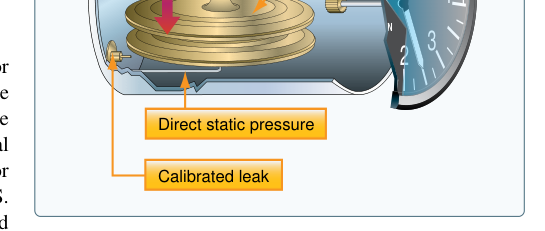
The vertical speed indicator is a pressure-differential instrument. It taps into the aircraft's static pressure system, just like the altimeter and the airspeed indicator. Inside the instrument case there are two pathways for static air: one leads directly into a sealed capsule (the aneroid bellows or diaphragm), and the other leads into the instrument case itself through a calibrated restrictor — a tiny orifice that deliberately slows the passage of air. Both the inside of the case and the inside of the capsule are ultimately connected to the same static source, but the restrictors cause a time delay in how quickly pressure equalizes.
When the aircraft is in level, unaccelerated flight, the pressure inside the capsule and the pressure inside the case are equal, so the diaphragm is neither expanded nor compressed. The needle rests at zero. When the aircraft climbs, static pressure decreases. The capsule senses that lower pressure almost immediately, but the air inside the instrument case must bleed out through the tiny orifice before it can equalize. That pressure differential — case pressure slightly higher than capsule pressure — causes the diaphragm to compress, and a mechanical linkage translates that compression into an upward needle deflection indicating a climb. The greater the rate of altitude change, the greater the pressure differential maintained across the restrictor, and the higher the needle deflects.
Descent works in reverse: static pressure rises, the capsule feels it first, the case lags behind, and the resulting differential pushes the diaphragm the other way, moving the needle downward. When level flight is resumed, the pressures slowly equalize through the orifice and the needle returns to zero. It is this equalization process — governed entirely by the size of that calibrated orifice — that produces the famous VSI lag.
The Six-to-Nine Second Lag
The FAA Instrument Flying Handbook (FAA-H-8083-15) identifies the VSI's inherent lag as approximately six to nine seconds. This is not a defect that can be corrected by maintenance; it is a fundamental consequence of the instrument's design. During those six to nine seconds after a pitch change, the needle is still indicating the previous rate of climb or descent (or zero, if you just started a maneuver). Only after that delay does the needle settle to a value that accurately reflects your actual vertical speed.
This lag has two important consequences in the cockpit. First, if you initiate a climb and then scan to the VSI, you may see little or no upward deflection for several seconds, leading to the false impression that the maneuver has not taken effect. Second, if you then push or pull to get a response, and the VSI finally catches up and shows a large deflection, you may over-correct — creating an oscillation in pitch that perpetuates itself. This phenomenon, often called chasing the needle, is one of the most common errors on instrument check rides and in actual IMC.
There is one exception worth knowing: the instantaneous vertical speed indicator (IVSI), which incorporates small accelerometers (dashpot pistons) that sense vertical acceleration immediately and briefly inject or extract air from the capsule to reduce the lag to nearly zero. The IVSI is found on some higher-performance and transport-category aircraft. The standard VSI found on most training aircraft does not have this feature, so the six-to-nine second lag applies.
Trend vs. Control: Why the Distinction Matters
FAA guidance categorizes flight instruments into three functional groups: control instruments, performance instruments, and navigation instruments. The attitude indicator and the power instruments are control instruments — you use them to set a specific aircraft configuration. Performance instruments include the altimeter, airspeed indicator, and turn coordinator; they tell you what the aircraft is actually doing as a result of your control inputs. The VSI is a performance instrument with special status as a trend instrument because of its lag.
In practical terms, this means:
- Use the attitude indicator to set pitch. If you want a 500 ft/min descent, you establish a pitch attitude on the AI that experience tells you produces that rate in your aircraft at the current power setting.
- Use the altimeter as the primary performance reference for altitude. The altimeter is direct-reading, with no appreciable lag. It tells you exactly where you are right now.
- Use the VSI to confirm trend and rate. After six to nine seconds have elapsed, the VSI will confirm whether your selected pitch attitude is producing the desired vertical speed. It tells you which direction you are heading and at roughly what rate.
If the VSI shows you climbing at 700 ft/min when you want 500 ft/min, you make a small pitch adjustment on the attitude indicator — you do not chase the VSI needle directly. Then you wait another scan cycle (six to nine seconds) and check again. This disciplined, patient approach is the heart of the instrument scan.
Using the VSI During IFR Procedures
During an instrument approach, the VSI is invaluable for detecting an unstabilized glidepath. If you are on a precision approach and the VSI shows 900 ft/min down when your target is 700 ft/min, the trend information tells you the aircraft is descending faster than desired — even if the glide slope needle has not fully deflected yet. Similarly, on a non-precision approach, the VSI can warn you of an inadvertent descent below the minimum descent altitude (MDA) before the altimeter catches up to confirm it.
During climbs after departure, ATC often assigns crossing altitudes or climb rates. Monitoring the VSI gives you early warning if your aircraft is failing to meet the required rate, perhaps due to a density altitude or weight issue. On level-offs, leading the level-off by approximately 10 percent of the climb or descent rate is a standard technique. If you are descending at 1,000 ft/min and want to level at 8,000 feet, begin the pitch change at approximately 8,100 feet. The VSI trend information, combined with the altimeter, helps you time this transition correctly.
Key Numbers and Rules
- VSI lag: Approximately 6–9 seconds on a standard VSI.
- IVSI lag: Essentially zero due to accelerometer-assisted design; found in higher-performance aircraft.
- VSI classification: Trend (performance) instrument — not a control instrument.
- Static system blockage: A blocked static port will freeze the altimeter, cause the airspeed indicator to read incorrectly, and cause the VSI to read zero regardless of actual vertical movement.
- Alternate static source: Selecting the alternate static source in most unpressurized aircraft will cause the VSI to momentarily deflect and then re-stabilize; readings may differ slightly from the primary due to the difference in local static pressure inside the cockpit.
- Lead point for level-off: Begin pitch change approximately 10% of the vertical speed rate before the target altitude (e.g., 100 feet early for a 1,000 ft/min rate).
- Pitot-static errors: The VSI is unaffected by pitot blockage, because it uses only the static system. A pitot blockage affects only the airspeed indicator.
Common Test Traps
- The VSI as a control instrument: The FAA knowledge test may ask which instrument should be used to set a desired pitch — the answer is always the attitude indicator, not the VSI. The VSI confirms the result of your pitch setting.
- Lag duration: Questions sometimes present answer choices of 2–3 seconds or 10–15 seconds alongside the correct 6–9 seconds. Memorize the specific range.
- Static port blockage freezes the VSI at zero: A blocked static system will cause the VSI to show zero in all phases of flight — it does not freeze at its last reading the way the altimeter does. This is a frequently tested detail.
- IVSI vs. standard VSI: Know that the IVSI eliminates lag but is not standard equipment on most training aircraft. Do not assume all VSIs behave like an IVSI.
- Alternate static source effects: Using the alternate static source causes a temporary VSI deflection and may produce slightly different indicated values. Test questions may ask whether VSI readings change when the alternate source is selected — they do, briefly, then re-stabilize.
Mastering the VSI means accepting its limitations gracefully and using it for what it does well: providing early trend information that, when read with patience and cross-checked against the altimeter and attitude indicator, contributes to smooth, precise instrument flight. The pilot who understands lag does not chase the needle — and that pilot stays both current and proficient in the IFR environment.