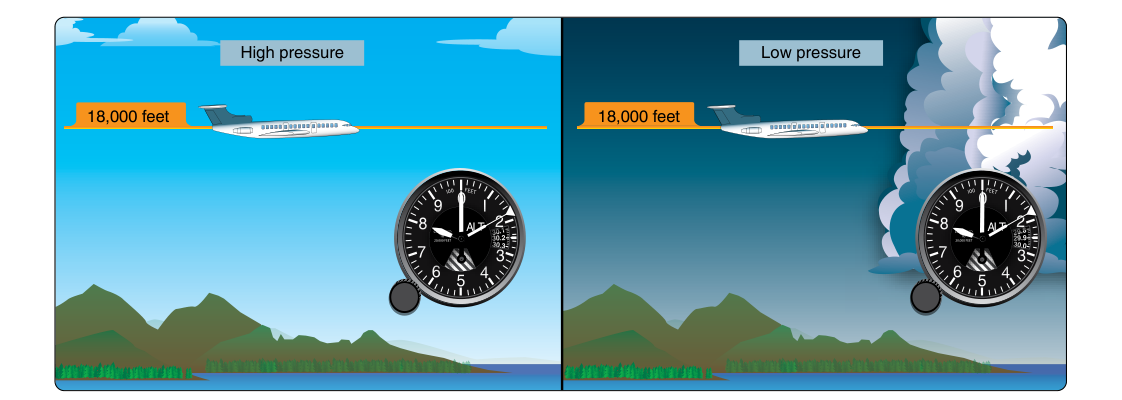
Of all the flight instruments in the cockpit, the altimeter is arguably the most safety-critical for terrain and traffic separation. Yet its accuracy depends entirely on one small but vital habit: keeping the Kollsman window set to the current local altimeter setting. Dial in the wrong value — or ignore it altogether — and your altimeter can mislead you by hundreds of feet, sometimes at the worst possible moment. This article explains exactly how the altimeter works, what the Kollsman window does, when and how to update it, and the regulatory requirements that govern its use.
Understanding the altimeter also means understanding the atmosphere itself. The instrument does not "see" the ground or measure distance directly. It reads air pressure and converts that pressure into an altitude indication based on a mathematical model of the standard atmosphere. Because real atmospheric pressure changes constantly with weather and location, the pilot must continuously update the reference pressure — that reference is what the Kollsman window holds.
How the Altimeter Works
Inside a sealed instrument case, one or more thin corrugated metal capsules called aneroid wafers expand and contract as outside air pressure changes. Ram air is excluded; the case samples static pressure from the aircraft's static port. As the aircraft climbs, static pressure decreases, the wafers expand, and a series of mechanical gears and levers translate that expansion into a pointer movement on the face of the instrument. Descending increases static pressure, compresses the wafers, and drives the pointers in the opposite direction.
The altimeter face typically has three pointers: a short hand for tens of thousands of feet, a medium hand for thousands of feet, and a long thin hand for hundreds of feet — similar in concept to a clock face. Reading all three together gives the indicated altitude. A common misread trap is confusing the thousands and ten-thousands pointers, which has contributed to controlled-flight-into-terrain accidents.
The Kollsman Window and Altimeter Setting
On the face of the altimeter is a small window — usually in the lower right quadrant — called the Kollsman window (also referred to as the baro-set window or pressure window). Inside it you can see a number expressed in inches of mercury (in Hg), typically ranging from about 28.00 to 31.00 in Hg. A small knob on the instrument case, called the baro-set knob or Kollsman knob, allows the pilot to rotate this scale. Turning the knob simultaneously moves the altitude pointers, effectively telling the instrument what sea-level pressure to use as its baseline.
When you receive an altimeter setting of, say, 29.92 in Hg and dial it into the Kollsman window, you are telling the altimeter: "Treat 29.92 in Hg as the pressure that exists at mean sea level right now." The instrument then calculates your height above that reference and displays it as indicated altitude. If the altimeter is set correctly and you are sitting at an airport whose field elevation is 1,200 feet MSL, the instrument should read approximately 1,200 feet — a useful built-in sanity check every pilot should use before flight.
Types of Altitude — Why the Setting Matters
A firm grasp of altitude types is essential both for the knowledge test and for real operations:
- Indicated Altitude: What the altimeter reads with the current altimeter setting dialed in. This is what ATC and the FAA mean by "altitude" in normal operations.
- True Altitude: Actual height above mean sea level (MSL). Indicated altitude equals true altitude only under standard atmospheric conditions (15 °C, 29.92 in Hg at sea level). In colder or lower-pressure air, true altitude is lower than indicated altitude.
- Pressure Altitude: The altitude read when 29.92 in Hg is set in the Kollsman window. Used for performance calculations and for flight above 18,000 feet MSL (Class A airspace), where all aircraft fly on a standardized pressure of 29.92 — called Flight Level operations.
- Density Altitude: Pressure altitude corrected for non-standard temperature. Not read from the altimeter directly, but critical for aircraft performance.
- Absolute Altitude: Actual height above ground level (AGL). Cannot be read from a standard altimeter without knowing terrain elevation.
When and How to Update the Altimeter Setting
The FAA requires, under 14 CFR 91.121, that when flying below 18,000 feet MSL, the altimeter must be set to the currently reported altimeter setting of a station along the route and within 100 nautical miles of the aircraft. If no such station is available, the altimeter must be set to the elevation of the departure airport or an appropriate altimeter setting available before departure. Above 18,000 feet MSL (Class A airspace), all pilots set 29.92 in Hg, and ATC manages separation using standardized pressure altitude — this is why you will hear pilots say they are at "Flight Level 250" rather than "25,000 feet."
In practice, update your altimeter setting:
- Before engine start, using the current ATIS or AWOS/ASOS broadcast.
- When cleared onto the runway, as a final check (compare indicated altitude to field elevation — they should be within about 75 feet of each other).
- En route, each time you receive a new altimeter setting from ATC, Flight Service, or an automated weather source.
- When approaching a destination airport, no later than receiving the ATIS or terminal weather information.
The rule of thumb most instructors teach is: if you update it every time you talk to a new ATC facility or automated station, you will rarely be out of compliance.
Effect of an Incorrect Altimeter Setting
The numbers here are important and frequently tested. The altimeter changes approximately 1,000 feet of indicated altitude for each 1.00 in Hg change in the Kollsman window setting — or put more precisely, about 1 inch of mercury equals roughly 1,000 feet. So a setting error of just 0.10 in Hg produces roughly a 100-foot error in indicated altitude. Flying with an altimeter setting that is too low means your actual altitude is lower than the instrument shows — a dangerous situation near terrain or minimum altitudes. The classic memory phrase captures this well:
Memory Aid
"High to low, look out below." If you fly from a high-pressure area into a low-pressure area (where the correct altimeter setting is lower) without updating the Kollsman window, your altimeter will read higher than your actual altitude — you are lower than you think. The rhyme reminds you that moving toward lower pressure (or lower temperature) means your true altitude is lower than indicated.
Similarly, non-standard temperature affects true altitude even when the baro setting is correct. Cold, dense air compresses the atmospheric column, so true altitude is lower than indicated when temperatures are below standard (ISA). This is particularly critical during instrument approaches in cold weather, where some approach procedures now require temperature corrections.
Key Numbers and Rules
- 14 CFR 91.121: Altimeter setting requirement — within 100 NM of a reporting station, below 18,000 feet MSL.
- 18,000 feet MSL: Transition altitude — above this, set 29.92 in Hg (Flight Levels).
- 29.92 in Hg / 1013.2 hPa: Standard sea-level pressure; used for pressure altitude and Class A airspace.
- ~1 in Hg = ~1,000 feet: Approximate altimeter error per inch of mercury mis-set.
- 75-foot tolerance: If your altimeter indicates more than approximately 75 feet off field elevation with the correct setting dialed in, the instrument may be inaccurate and should be checked before an IFR flight (14 CFR 91.411 specifies a 24-calendar-month altimeter inspection requirement for IFR operations).
- Altimeter range: Typically 28.00–31.00 in Hg; extremely low pressure (tropical cyclones) can fall outside this range.
Common Test Traps
- Confusing "high to low" direction: Students often mix up whether indicated is high or low. Remember: moving to lower pressure WITHOUT updating means you are actually LOWER than indicated — the altimeter reads too high.
- Pressure altitude vs. indicated altitude: Pressure altitude is only read when 29.92 is set. Any other setting gives indicated altitude, not pressure altitude. The test will ask you to calculate pressure altitude — always set 29.92 first (mentally or on the E6B).
- Misreading the three-pointer face: The ten-thousands pointer is short and easy to overlook. If an exam question shows a diagram with the long hand near 500 feet but the thousands hand at 9, the altitude is 9,500 feet — not 500 feet.
- Forgetting the 100 NM rule: The regulation does not say "nearest airport" — it says within 100 NM along the route. A station slightly farther along the route but within 100 NM qualifies; a station 110 NM away does not satisfy the regulation on its own.
- Assuming cold temperature errors are zero: A correctly set baro setting does not mean your true altitude matches indicated altitude in very cold air. The altimeter is calibrated to standard temperature lapse rates; cold air is denser, compressing the altitude scale and making true altitude lower than indicated.
Staying on top of your altimeter setting is one of the simplest and most effective habits in the cockpit. Every new clearance, every weather broadcast, every facility handoff is an opportunity to verify that small window — and each verification is a layer of protection between you, the terrain, and other traffic.