Every time a controller asks you to "squawk altitude," your transponder is broadcasting a number derived not from your altimeter setting — but from a fixed reference called standard sea level pressure. That number is your pressure altitude, and it can differ significantly from the altitude you actually read on your altimeter. Understanding the difference between pressure altitude and indicated altitude is not just an FAA knowledge test staple; it's fundamental to how the entire national airspace system keeps aircraft separated and how performance charts work in your aircraft's Pilot Operating Handbook (POH).
This article digs into the mechanics of how your altimeter encodes and reports altitude, what the Kollsman window really controls, and exactly when each type of altitude matters in the cockpit.
How the Altimeter Works
The altimeter is a differential pressure instrument. Inside it sits a set of sealed, corrugated metal capsules called aneroid wafers. These wafers are evacuated internally and exposed on the outside to static air pressure from the static port. As the aircraft climbs, atmospheric pressure decreases, the wafers expand, and that expansion is mechanically translated — through a series of levers and gears — into a pointer movement on the face of the instrument. Descend, and the higher pressure compresses the wafers, rotating the pointer back down. The instrument is, at its heart, a barometric pressure gauge calibrated in feet.
Because actual sea-level pressure varies from day to day and place to place, the altimeter includes a Kollsman window (also called the baro set knob). Rotating this knob physically adjusts the entire scale of the instrument, shifting all altitude readings up or down without changing the aneroid wafer mechanism. When you dial in the current altimeter setting — say, 29.92 in-Hg or 1013.2 mb — you are referencing your readings to that specific pressure datum. The altitude you then read is called indicated altitude.
Indicated Altitude vs. Pressure Altitude
Indicated altitude is simply whatever the altimeter reads when you have a current local altimeter setting dialed into the Kollsman window. If the tower gives you an altimeter of 30.15 in-Hg and you set it, your altimeter reads indicated altitude corrected to that local pressure datum. Ideally, indicated altitude equals true altitude (actual height above mean sea level) when temperature and pressure conditions match the International Standard Atmosphere (ISA) — but in practice, temperature deviations cause additional errors, which is why the FAA also defines true altitude separately.
Pressure altitude, by contrast, is what the altimeter reads when 29.92 in-Hg is set in the Kollsman window. This is the reference pressure of the International Standard Atmosphere (ISA) at sea level. When you dial in 29.92, you remove the local pressure correction and reference all altitude readings to that single, universal datum. Pressure altitude tells you where you are in the column of the standard atmosphere — nothing more, nothing less.
The relationship between the two is straightforward to calculate: for every 0.01 in-Hg difference between the current altimeter setting and 29.92, the pressure altitude differs from indicated altitude by approximately 10 feet. If the altimeter setting is 30.12 (which is 0.20 in-Hg above 29.92), pressure altitude is about 200 feet lower than indicated altitude. Conversely, a low-pressure setting of 29.72 (0.20 below 29.92) places pressure altitude about 200 feet higher than indicated altitude. A useful check: higher-than-standard pressure compresses the atmosphere near the surface, so the same physical altitude corresponds to a lower pressure altitude.
How Encoding Altimeters Feed the Transponder
When ATC requests Mode C altitude reporting — or when your aircraft operates where 14 CFR 91.215 mandates an encoding altimeter and transponder — the system works like this: a separate mechanism inside the encoding altimeter (or a blind encoder mounted elsewhere in the aircraft) senses static pressure and converts it to a digital code sent to the transponder. Crucially, this encoder always reports pressure altitude regardless of what setting is in the Kollsman window.
The encoder outputs what is called a Gillham code — a specific type of Gray code — representing pressure altitude in 100-foot increments. The transponder broadcasts this code on 1090 MHz each time it is interrogated by secondary surveillance radar. ATC computers then automatically add the local altimeter setting correction to convert the reported pressure altitude into indicated altitude for display on the radar scope. The controller sees an altitude that closely matches your actual indicated altitude — but the raw data stream is always pure pressure altitude referenced to 29.92.
This architecture exists for a critical safety reason: if every aircraft reported indicated altitude (referenced to its own local altimeter setting, which may differ from the next airport's setting), the ground system would have to know each aircraft's exact Kollsman setting at every moment. By standardizing on 29.92 at the encoder level, the system uses one universal reference, and only one correction is needed at the ATC computer.
Why It Matters in the Cockpit
Beyond ATC separation, pressure altitude is the direct input for two other critical calculations: density altitude and performance data.
Density altitude is pressure altitude corrected for non-standard temperature. Your aircraft's engine, propeller, and wings all respond to air density — not to the numbers on your altimeter dial. On a hot, humid day at a high-elevation airport, density altitude can exceed pressure altitude by thousands of feet, drastically reducing climb performance and increasing takeoff roll. Because aircraft performance charts are built on pressure altitude (with a temperature correction for density altitude), you must know your pressure altitude to use those charts correctly.
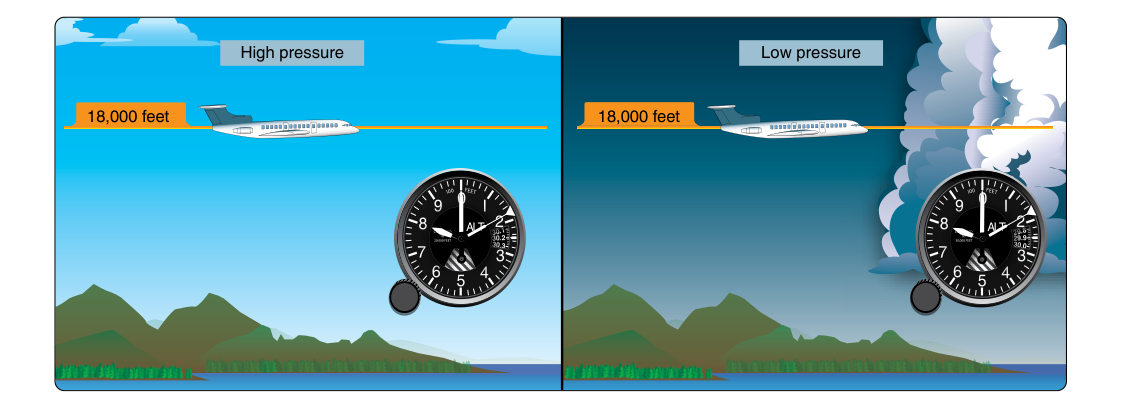
In the flight levels — at or above Flight Level 180 (18,000 ft MSL) in the United States — all aircraft set 29.92 in the Kollsman window. At that point, indicated altitude and pressure altitude become identical. This standard removes ambiguity at high altitudes where altimeter settings would vary too widely to be practical and ensures uniform vertical separation across the entire RVSM (Reduced Vertical Separation Minimum) environment.
Key Numbers and Rules
- 29.92 in-Hg (1013.2 mb/hPa): Standard sea-level pressure; set this to read pressure altitude.
- ~10 ft per 0.01 in-Hg: Conversion factor between altimeter setting and pressure altitude difference.
- 18,000 ft MSL (FL180): Altitude above which all U.S. IFR aircraft must set 29.92 (14 CFR 91.121).
- 100-foot increments: Minimum reporting resolution of a Mode C encoder (Gillham code).
- ±125 ft: Maximum allowable error for a Mode C encoder per 14 CFR 91.217 — encoders must be checked periodically to confirm accuracy.
- Local altimeter setting: Broadcast on ATIS, ASOS/AWOS, and by ATC; always set before departure and updated en route to keep indicated altitude accurate.
- Higher altimeter setting → lower pressure altitude (and vice versa): When local pressure is above 29.92, pressure altitude is below indicated altitude.
Common Test Traps
- Confusing what the encoder reports. The encoder always reports pressure altitude (29.92 reference), not indicated altitude. Even if you have 30.15 set in your window, Mode C is still transmitting based on 29.92. Many students assume the transponder reads the Kollsman window — it does not.
- Mixing up the correction direction. A high pressure setting (above 29.92) means pressure altitude is lower than indicated altitude. Remember: you need more atmospheric column to reach a higher pressure environment, so the pressure-based scale puts you lower. "High pressure setting — pressure altitude is lower."
- Forgetting density altitude requires both pressure altitude AND temperature. Pressure altitude alone does not account for temperature. On a cold day at pressure altitude 5,000 ft, density altitude is lower than 5,000 ft; on a hot day, it's higher. The FAA knowledge test frequently presents hot-day scenarios and asks for density altitude, requiring the temperature correction step.
- Assuming FL180 applies to all aircraft. The requirement to set 29.92 above 18,000 ft MSL applies to IFR operations in controlled airspace. The test may phrase questions about when you must set 29.92 — know that 14 CFR 91.121 governs this.
- Overlooking the ±125-ft accuracy rule. Questions sometimes ask about the maximum allowable Mode C altitude discrepancy. If ATC advises you that your Mode C readout appears invalid or unreasonably different from your indicated altitude, you should deactivate altitude reporting per ATC instructions (AIM 4-4-13) and notify ATC — 14 CFR 91.217 itself does not specify a fixed discrepancy threshold like 300 feet.
Practical Cockpit Summary
Think of your altimeter as a tool with two modes: when you dial in the current local setting, it tells you approximately where you are above sea level in the real atmosphere (indicated altitude). When you dial in 29.92, it strips away the local correction and tells you where you are in the standard atmosphere (pressure altitude). Your transponder's encoder always operates in that second mode — 29.92 only — so ATC radar data is always grounded in a single universal reference before the ground computer applies a correction for local conditions.
Keeping these two altitudes straight pays dividends across multiple areas of flight: complying with Mode C requirements, computing takeoff and climb performance, calculating density altitude for hot-and-high operations, and understanding why ATC occasionally questions your reported altitude. Master the 10-ft-per-0.01-in-Hg rule, remember that encoders ignore your Kollsman window, and always apply the local altimeter setting as soon as it's available — that's the foundation of accurate altitude awareness throughout every flight.